Chickens Emotion Mouse Pad: Elevate Your Desk with Creative Sublimation Art
The tools we use daily quietly shape our workflow. A keyboard, a monitor, a mouse—each piece plays a role in how efficiently you work and how much you enjoy the time spent at your desk. Yet the mouse pad is often the last item anyone upgrades. It is typically a freebie from a conference, a generic black rectangle, or a stained cloth that has seen better days. What if that small surface could do more? What if it could make you smile, spark a conversation, or subtly boost your mood while providing a smooth tracking surface for your mouse?
The Chickens Emotion Mouse Pad offers exactly that. It is a meticulously designed digital artwork set intended for sublimation printing. This guide walks you through what this product truly offers, the common mistakes people make when purchasing and printing custom sublimation pads, and the straightforward steps to ensure you end up with a durable, vibrant, and genuinely enjoyable desk accessory.
What Is the Chickens Emotion Mouse Pad Pack?
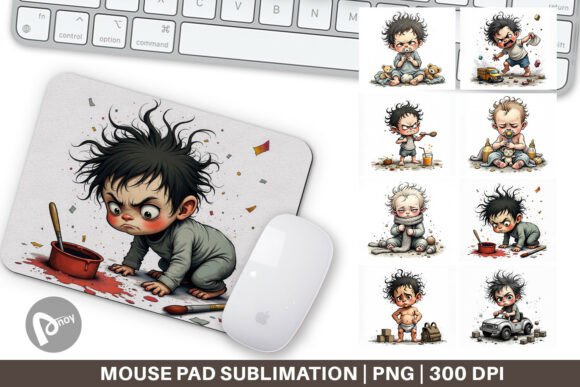
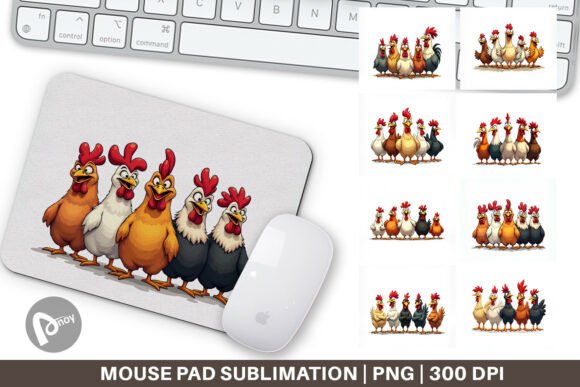
First, it is essential to understand the format. This is not a single, mass-produced cloth pad shipped to your door. Instead, you receive a collection of 8 high-resolution PNG files, each sized at 9.5 x 8.1 inches at 300 DPI. Every file features a distinct chicken with a unique emotional expression—curious, determined, sleepy, joyful, or focused. The artwork is playful yet crisp, designed to hold up under close inspection on your desk.
The intended use is sublimation printing. Sublimation is a process where heat turns solid dye into gas, which then bonds permanently with a polyester surface. The result is a print that cannot peel, crack, or fade like standard transfers. Because you are working with digital files, you hold the power to produce the physical pad exactly when you need it, on the blank of your choice. This flexibility is a major advantage, but it also requires a clear understanding of the workflow.
Mistake #1: Treating This Like a Physical Product That Arrives Ready to Use
The most common point of confusion is simple: this is a digital download. You are purchasing a license and a high-resolution design file, not a finished mouse pad. A lot of people scan the product description, see the attractive images, and expect a package to arrive in the mail. When it doesn't, frustration follows.
Why does this matter? Because understanding the digital nature unlocks the product's true value. You can print one pad for yourself, experiment with different blank materials, or gift the files to a friend who has a sublimation setup. You are not limited to a single copy. The 8-file set gives you variety. You can rotate designs based on your mood or the season. Avoid the disappointment by reading the listing carefully and confirming you have a way to print the design before you buy.
Mistake #2: Choosing the Wrong Sublimation Blank Material
Sublimation is not magic. It requires specific chemistry to work correctly. The dye only bonds with polyester polymers. If you try to press this design onto a standard cloth mouse pad made of cotton or a rubber-coated surface, the image will wash out, appear faded, or crack after light use.
What should you look for? A high-quality polyester mouse pad blank specifically manufactured for sublimation. Many blanks are available online, ranging from fine microfiber surfaces to smoother, tightly woven polyester textures. The surface needs a high polyester count—ideally 100%—to achieve the vibrant colors and sharp lines the design promises. A common mistake is buying a cheap blank that claims to be "sublimation friendly" but has a low polyester blend. Test your blank with a small print first. If the colors look muddy or the white areas turn yellow, the blank is likely the problem, not your design file.
Mistake #3: Ignoring the 300 DPI and Native Size Constraints
The Chickens Emotion Mouse Pad files are carefully constructed at 300 DPI (dots per inch) and a specific canvas size of 9.5 x 8.1 inches. These numbers matter. 300 DPI ensures the details in the chicken feathers, eyes, and background remain razor-sharp. Scaling the image up in a basic editor stretches the pixels and destroys this clarity.
Why is this a common pitfall? People often assume they can just enlarge the file to fit a larger desk pad. Attempting to make this specific design fit a 12 x 10 inch blank without proper software will result in a blurry, unprofessional print. Respect the native dimensions. 9.5 x 8.1 inches is a thoughtful size—compact enough for a tidy keyboard tray or a small desk, yet large enough for comfortable mouse tracking without clutter. If you need a larger pad, look for a design that is natively created at that larger size.
Mistake #4: Forgetting to Mirror the Image Before Printing
This is a classic oversight in the sublimation workflow. The design on your computer screen looks correct. You print it onto sublimation paper. Then, when you heat press it onto the blank, the image transfers exactly as printed—which means it reverses horizontally. If the design has directional elements, like a chicken looking to the right, the final product will have it looking to the left.
Does it always ruin the design? For purely symmetrical patterns, it might not matter. But for the expressive chicken artwork, orientation matters. A misaligned gaze or reversed text can subtly feel "off." Always mirror the image horizontally in your software before printing onto sublimation paper. Make this a non-negotiable step in your workflow. A quick double-check saves you from wasting a blank and a print sheet.
Mistake #5: Overlooking the Emotional Impact of the Design Choice
This might sound subjective, but it directly affects your experience. The "Emotion" in Chickens Emotion Mouse Pad is the core feature. Each of the 8 files captures a distinct mood. Choosing a design that clashes with your work style can subconsciously affect your comfort.
For example, if you are in a high-stress, fast-paced work environment, a chicken with a frantic or wide-eyed expression might amplify that anxious energy. On the other hand, a calm, sleepy, or content chicken might be perfect for a relaxing creative space. The solution is to be intentional. Select an expression that matches the tone you want in your workspace. Use the determined chicken for deep work sessions. Use the joyful chicken for your personal gaming setup. Rotating them based on your schedule is a creative way to keep your desk environment fresh and aligned with your tasks.
Practical Workflow: From PNG to Finished Mouse Pad
To help you avoid the mistakes above, here is a straightforward, repeatable process for turning your digital files into a professional-quality mouse pad.
- Unpack and Review: Unzip the downloaded folder. Open each PNG file in reliable graphic software (Photoshop, GIMP, Affinity Photo, or Procreate). Confirm the resolution is set to 300 DPI and the canvas is 9.5 x 8.1 inches. Do not resize downward aggressively, as you will lose resolution.
- Select Your Mood: Choose the chicken emotion that fits your current workspace or task. Duplicate the file if you want to keep an unaltered master copy.
- Mirror the Image: Before printing, flip the canvas horizontally. This is imperative for sublimation. Double-check your software's settings to ensure the mirror is applied correctly.
- Print with the Right Profile: Load sublimation paper into your printer (which must be equipped with sublimation ink). Use the correct ICC color profile for your specific printer and paper combination. This ensures the blacks are deep and the colors are accurate, not washed out or greenish.
- Prepare the Blank: Preheat your mouse pad blank for 15 seconds at 385°F to remove any moisture. Place it on your heat press.
- Tape and Protect: Position your printed sublimation paper face-down onto the blank. Secure the edges with heat-resistant tape so it does not shift. Place a Teflon protective sheet over the paper to prevent ink bleed onto your platen.
- Press Correctly: Apply medium to firm pressure. Press at 385°F to 400°F for 50 to 60 seconds. Time and temperature vary slightly by blank, so follow the blank manufacturer's recommendations as a baseline.
- Peel and Inspect: Some papers require a hot peel, others a cold peel. Check the instructions for your sublimation paper. Peel slowly and inspect the color vibrancy and sharpness. If the colors are faded, your press time or temperature may be too low.
The 8-File Advantage: More Than Just Variety
Do not let the other files sit unused on your hard drive. The collection of 8 emotions is designed for versatility. You can print a set for different days of the week or create coordinated desk accessories. These designs also make excellent, thoughtful gifts for fellow chicken lovers, colleagues, or friends who appreciate quirky desk decor. Because you own the files, you are not limited to a single use, provided you respect the personal or commercial license terms. This flexibility is what makes a digital product genuinely valuable.
Final Checks Before You Commit
Before purchasing or printing, run through this quick checklist to ensure a smooth experience and a high-quality final product.
- Printer Compatibility: Do you have a sublimation printer, or access to a print-on-demand service that accepts high-resolution PNG files?
- Blank Quality: Is your mouse pad blank made of 100% polyester or specifically coated for sublimation?
- Software Preparedness: Do you have software capable of handling 300 DPI PNG files and mirroring the image?
- Size Appropriateness: Does 9.5 x 8.1 inches fit comfortably within your desk space and mouse movement range?
- Design Intent: Does the chicken's expression align with the atmosphere you want to cultivate while you work or game?
Making informed decisions about the small details in your workspace pays off in daily comfort and satisfaction. The Chickens Emotion Mouse Pad offers a rare combination of artistic personality and functional design. By understanding the digital format, respecting the sublimation process, and avoiding the common pitfalls outlined here, you will end up with a durable, vibrant piece of desk art that genuinely enhances your time at the computer.