Fantasy Armor Vector Clipart Set
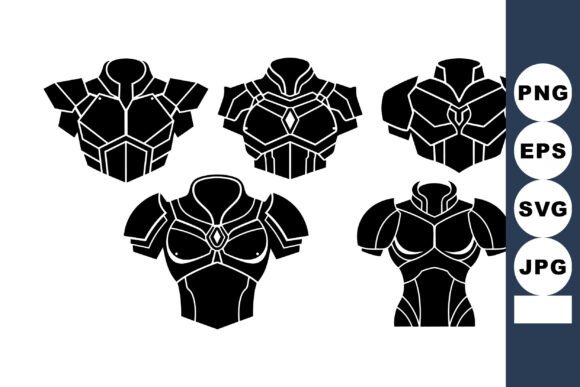
A single chest plate silhouette can define an entire character. When you have five distinct futuristic armor designs, each rendered in clean black with symmetrical, flat minimal styling, you hold a toolkit that bridges sci-fi themes and practical design work. This Fantasy Armor Vector Clipart Set delivers exactly that—five unique chest plate silhouettes packaged in SVG, EPS, JPG, and PNG formats, all inside one downloadable ZIP. The appeal is not just in the visuals themselves but in how easily they adapt to real projects: game assets, branding elements, educational materials, apparel graphics, or concept art foundations. The flat minimal approach ensures these designs read clearly at any size, on any background, and across any medium.
What Makes This Set a Practical Asset
Symmetry is one of the most reliable design principles for armor because it instantly communicates structure, balance, and readiness. These silhouettes lean into that strength. Each chest plate stands on its own as a bold geometric statement, yet none of them feel generic. One might evoke a medieval knight reimagined through a cybernetic lens. Another suggests reinforced plating suited for deep-space exploration. A third carries the angular sharpness of a combat drone’s chassis. Because the set sticks to black silhouettes without internal detail, you are free to layer textures, gradients, or patterns over the top without fighting against pre-existing decoration.
The inclusion of both vector formats (SVG and EPS) and raster formats (JPG and PNG) removes technical friction. Vector files allow infinite scaling without quality loss—perfect for large-format prints or responsive web layouts. PNG files with transparent backgrounds drop directly into mockups, social graphics, or slide decks. JPG versions work as quick placeholders or reference layers. This range means you are not locked into one workflow. Whether you prefer Affinity Designer, Illustrator, Figma, Photoshop, or even a free tool like Inkscape, the files open and behave predictably.
Creative Applications Across Different Goals
The versatility of this Fantasy Armor Vector Clipart Set becomes clear when you consider how different users might approach the same five silhouettes.
Game Asset Prototyping
Indie game developers and hobbyist creators often need to iterate quickly on character concepts before committing to high-detail modeling or animation. These silhouettes serve as instant placeholders for chest armor in 2D side-scrollers, top-down RPGs, or even early 3D concept boards. Drop a silhouette onto a character sprite sheet, resize it, and test how it reads against different backgrounds. Because the designs are symmetrical and minimal, they also work well as stencils for texture painting in Blender or Substance Painter. You can import the SVG directly into your 3D software as a reference plane or even extrude it into a low-poly mesh for rapid prototyping.
Branding and Identity Elements
Small business owners and creators building a sci-fi or gaming brand can repurpose these silhouettes as logo marks, icon sets, or badge elements. A single chest plate shape, paired with a bold typeface, becomes an instantly recognizable emblem for a podcast, a Twitch channel, or a tabletop gaming community. Because the style is flat and minimal, it works on merchandise like stickers, enamel pins, or hat embroidery without losing detail. You can also rotate, flip, or crop individual silhouettes to create unique geometric patterns for website headers or social media templates.
Educational and Reference Materials
Educators, tutorial creators, and technical writers covering topics like character design, costume history, or sci-fi worldbuilding can use these silhouettes as clean visual examples. They illustrate how symmetry and silhouette readability affect viewer perception without distracting decoration. A design instructor might ask students to add internal linework or color blocking to each silhouette, turning the set into a hands-on exercise. A blogger writing about futuristic fashion trends could use the PNG files to create comparison grids or mood boards that show how armor design evolves across imagined timelines.
Print-on-Demand and Merchandise
Entrepreneurs and freelancers running print-on-demand stores can apply these silhouettes to t-shirts, hoodies, tote bags, or phone cases. The flat black style works well with one-color screen printing or heat transfer vinyl. Because the vector files are clean, you can resize each silhouette to fit product dimensions without worrying about pixelation. You might pair one chest plate with a motivational tagline, combine two silhouettes into a symmetrical mandala-like pattern, or use all five across a series of themed apparel drops.
Adapting the Set for Different Platforms and Formats
Each format in the ZIP serves a specific purpose, and understanding when to use each one keeps your workflow efficient.
SVG and EPS are your go-to for any project that requires scaling, editing, or integration into other vector artwork. These formats preserve anchor points, curves, and geometric precision. You can change the stroke weight, fill color, or even combine multiple silhouettes into one composite shape. For web designers, SVGs also support inline styling and animation via CSS, which opens doors for interactive elements like hover effects or loading animations on a landing page.
PNG with transparency works best when you need a ready-to-use image without editing software. Drop these into presentation slides, social media posts, email newsletters, or video overlays. Because the silhouettes are black on transparent backgrounds, they layer easily over colored gradients, photography, or textured backdrops. You can also apply blend modes in apps like Canva or Photoshop to change how the black interacts with underlying content.
JPG files are useful for quick previews, portfolio comps, or situations where transparency is not required. They also serve as lightweight references when collaborating with clients who may not have vector-compatible software.
Keeping Results Clear, Consistent, and Original
Working with pre-made silhouettes does not limit your originality—it provides a foundation you can build upon. The key is to treat each silhouette as a starting point rather than a final product. Here are practical ways to keep your results fresh while maintaining the visual clarity that flat minimal designs provide.
Layer textures thoughtfully. A carbon fiber pattern, a brushed metal gradient, or a subtle hexagonal grid can transform a flat black silhouette into something that feels materially real without losing its graphic punch. Because the original shape is simple, even one texture overlay creates a dramatic shift in tone.
Use color strategically. Swap the solid black for a dark navy, a deep burgundy, or a metallic silver to match a specific brand palette or game faction. You can also create duotone versions where the silhouette itself carries two colors—one for the main body and one for an inner outline or highlight.
Combine silhouettes for custom composites. Merge parts of different chest plates to create hybrid designs. The shoulder line from one silhouette might pair better with the collar shape from another. Vector software makes this kind of assembly non-destructive, so you can experiment without losing the originals.
Scale with intention. A chest plate silhouette that looks powerful at full size can become a subtle background pattern when scaled down and tiled. Repeating one shape across a grid with varied opacity creates a textile-like texture that works for wrapping paper, web backgrounds, or fabric designs.
Practical Inspiration for Different Audiences
If you are a freelance designer, consider offering clients a mood board that includes these silhouettes alongside color swatches and typography samples. It shows you have a directional starting point without over-committing to a specific look. For hobbyists and enthusiasts, printing the silhouettes onto sticker paper and cutting them out by hand can be a satisfying weekend project—especially if you are building a themed gaming journal or a custom dice tray. Marketers and publishers might incorporate one silhouette into a book cover for a sci-fi novel or use all five as chapter divider icons that reinforce the theme without distracting from text.
The flat minimal style also lends itself well to collaborative projects where multiple contributors need to work from a consistent visual anchor. Because the silhouettes are unambiguous and geometric, they translate easily across different software and skill levels. A team member using Procreate on an iPad can import the PNG and trace over it, while another in Inkscape can adjust anchor points directly in the SVG. This reduces friction and keeps the visual identity coherent from start to finish.
Making the Most of the Downloadable Formats
Since the ZIP includes all four file types for each of the five silhouettes, you have immediate flexibility. Store the SVG files in a master assets folder for long-term use. Keep the PNG files in a project-specific folder for quick access during client revisions or social media posting. Archive the EPS files as a fallback format for print shops that prefer legacy vector formats. The JPG files can live in a reference library alongside screenshots and inspiration boards. Organizing your download this way ensures you never have to re-export or re-download the set when a new project arrives.
For those who like to plan ahead, create a simple template document in your preferred design software that already imports all five silhouettes at a consistent scale. Label them by shape characteristics—something like angular, rounded, tapered, broad, and slim. This small upfront step saves time later when you need to test which silhouette best fits a character’s role or a brand’s personality.
Why This Set Works for Both Professionals and Beginners
Design experience level hardly matters with a resource this straightforward. Beginners benefit from the symmetry and clarity because they can focus on learning software tools—pen tool adjustments, layer organization, color fills—without wrestling with complex artwork. Professionals appreciate the same qualities because they can skip the initial sketching and move directly to iteration and refinement. The set respects both workflows by giving you complete, clean geometry that does not dictate how it must be used.
There is also a quiet confidence in using flat minimal silhouettes for sci-fi themes. The genre often leans toward intricate detail and busy surfaces, but a restrained silhouette can actually feel more futuristic by suggesting precision and restraint. A single bold shape communicates armor’s primary purpose: protection defined by structure. The viewer’s imagination fills in the rest, which is often more effective than over-explaining through excessive ornamentation.
Whether you are designing a character for a comic, building a brand for a gaming channel, teaching a lesson on silhouette readability, or simply experimenting with geometric shapes on a weekend afternoon, this Fantasy Armor Vector Clipart Set gives you five reliable foundations. The formats are ready. The symmetry is baked in. The style is timeless within its genre. What you build on top is entirely your own.